Voice & Subtitles
The line changed. The take did not.
Tools → Decnet → LocalizeShip → Voice & Subtitles
Voice and subtitles are the two localization assets most likely to drift silently. A text table can be updated in seconds; a re-record takes a studio booking. LocalizeShip binds both to source revisions so drift becomes visible.
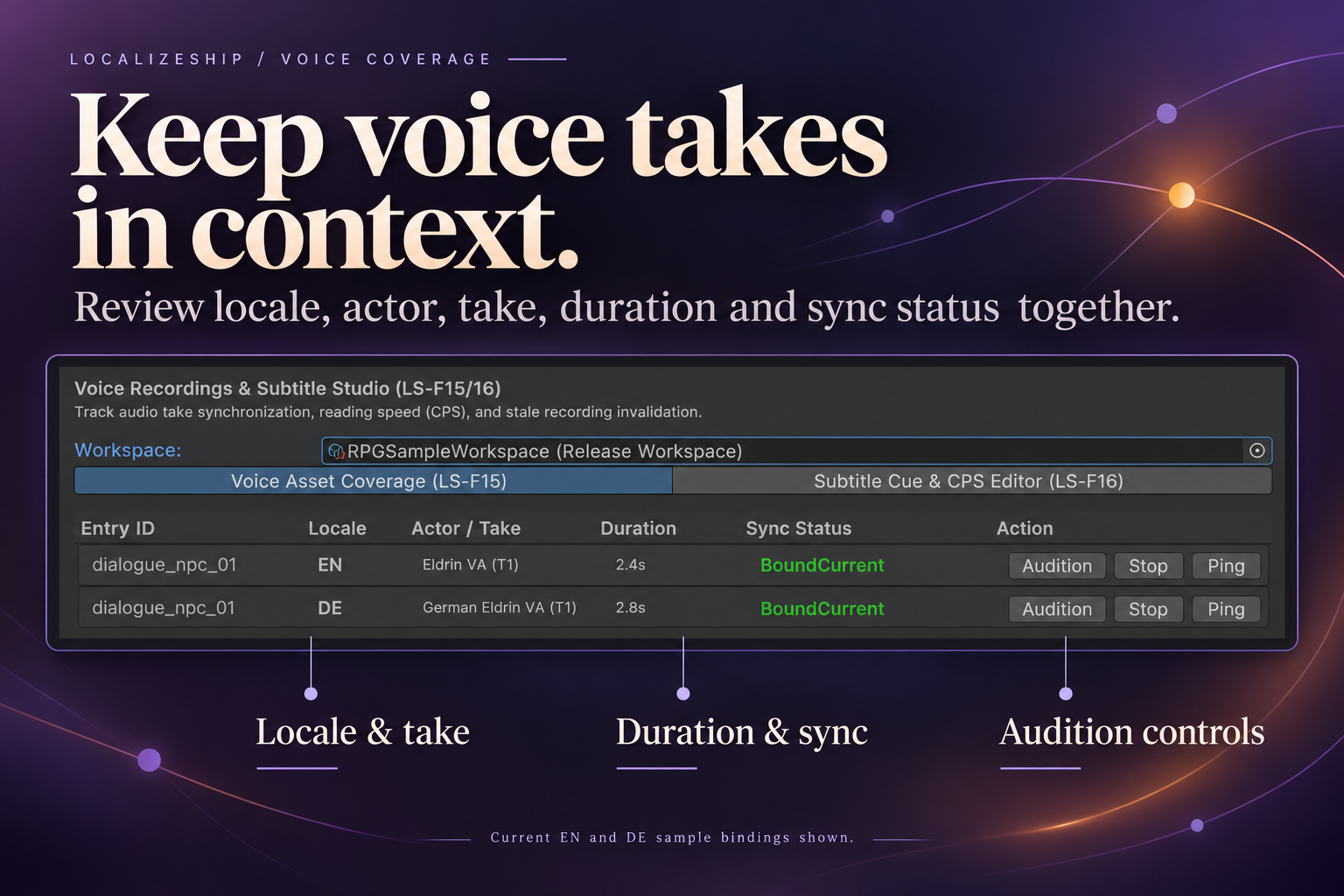
Voice entries
public class VoiceEntry
{
    public string VoiceId;
    public StableEntryId EntryId;
    public LocaleId Locale;
    public string ActorName;
    public int TakeNumber;
    public SourceRevisionHash BoundSourceHash;
    public TranslationRevisionHash BoundTranslationHash;
    public string AudioAssetPath;
    public float DurationSeconds;
    public float ExpectedDurationSeconds;
    public AudioMatchStatus Status;
}
Statuses
public enum AudioMatchStatus
{
    Missing,
    BoundCurrent,
    StaleSourceRevision,
    StaleTranslationRevision,
    DurationMismatch
}
RecheckStatus evaluates in order:
- No
AudioAssetPath→Missing. BoundSourceHash != currentSource→StaleSourceRevision.BoundTranslationHash != currentTranslation→StaleTranslationRevision.ExpectedDurationSeconds > 0and|Duration - Expected| > 2.0→DurationMismatch.- Otherwise →
BoundCurrent.
IsStale is true for the two stale statuses only:
public bool IsStale => Status == AudioMatchStatus.StaleSourceRevision ||
                       Status == AudioMatchStatus.StaleTranslationRevision;
DurationMismatchis not “stale” by this definition, and the release gate’s voice check only looks atIsStale. A take can mismatch duration and still pass the gate. Handle it as a separate policy if it matters to you.
When the check runs
RevisionTracker.ProcessSourceEntry rechecks voice entries for the edited line when the source hash changes:
var app = workspace.GetApproval(entryId, voice.Locale);
var transHash = app != null
    ? app.ApprovedTranslationHash
    : new TranslationRevisionHash(string.Empty);

voice.RecheckStatus(newRev.RevisionHash, transHash);
Because manual approvals in the Release Board pass default for the translation hash, a voice entry can flip to StaleTranslationRevision after a manual approval. Treat the translation-hash binding as opt-in until your integration supplies a real hash.
The Voice tab
Columns: entry ID, locale, actor/take, duration, sync status, actions.
Actions:
- Audition — loads the clip and calls Unity’s internal
UnityEditor.AudioUtil.PlayPreviewClipthrough reflection. - Stop — calls
StopAllPreviewClips. - Ping — selects the clip in the Project window.
Colours:
- stale → red;
- bound current → green;
- other → yellow.
The audition API is internal and can change between Unity versions. If reflection fails, the window logs a warning and does nothing. It does not throw into your console as an error.
Subtitle cues
public class SubtitleCue
{
    public string CueId;
    public StableEntryId EntryId;
    public LocaleId Locale;
    public float StartTimeSeconds;
    public float EndTimeSeconds;
    public string Text;
    public SourceRevisionHash BoundSourceHash;

    public float CharactersPerSecond =>
        Duration > 0 ? (Text != null ? Text.Length : 0) / Duration : 0f;

    public bool HasInvalidTiming =>
        StartTimeSeconds < 0 || EndTimeSeconds <= StartTimeSeconds;
}
Policy
public class SubtitlePolicy
{
    public float MaxCharactersPerSecond = 18.0f;
    public float MinCueDurationSeconds = 1.0f;
    public float MaxCueDurationSeconds = 7.0f;
    public int MaxCharactersPerLine = 42;
}
The Subtitle tab
Columns: entry ID, locale, time range, reading speed, editable text, audition.
CPS is displayed in green below the limit and red above it, with (EXCEEDED). Audition plays the bound voice entry when one exists for the same entry and locale.
What is enforced where
| Rule | Window | Release gate |
|---|---|---|
Invalid timing (start < 0 or end <= start) | Displayed in the table | Enforced |
CPS above MaxCharactersPerSecond | Displayed in red | Enforced |
| Minimum cue duration | Policy value only | Not enforced |
| Maximum cue duration | Policy value only | Not enforced |
| Maximum characters per line | Policy value only | Not enforced |
| Overlapping cues | Not checked | Not checked |
Voice Missing | Displayed | Not enforced |
Voice DurationMismatch | Displayed | Not enforced |
Voice StaleSourceRevision / StaleTranslationRevision | Displayed | Enforced |
Subtitle BoundSourceHash drift | Not shown directly | Not enforced |
That table is the honest version. The presence of a policy field does not mean a check exists.
The sample audio is synthetic
The RPG sample’s “voice takes” are procedurally generated sine waves:
| File | Frequency | Duration |
|---|---|---|
Voice_EN_Greeting.wav | 440 Hz | 2.4 s |
Voice_DE_Greeting.wav | 330 Hz | 2.8 s |
Voice_EN_Greeting_Outdated.wav | 520 Hz | 1.8 s |
They exist so the audition and duration logic can be demonstrated. They are not voice acting and must not be presented as a sample performance.
A practical voice/subtitle pass
- After a source edit, filter the Release Board to Stale.
- Open Voice & Subtitles and read the stale takes.
- Audition the current take and the replacement side by side.
- Check whether the translation changed as well; a source-only change may not require a new performance, but it does require a review decision.
- For subtitles, scan for red CPS and invalid time ranges.
- Re-run the gate and export the report after the fixes.
API notes
VoiceEntry.RecheckStatusis public; call it after any change to a bound hash.SubtitleCue.CharactersPerSecondcountsstring.Length(UTF-16 code units), not displayed graphemes. CJK and emoji will not match a human reading-speed estimate exactly.SubtitlePolicyis stored on the workspace and is serialized with it. Changing the limit changes future gate results but does not retroactively edit cues.